
Jump to: League Import | Running Reports | Querying ChatGPT Through Razzbot
What is Razzbot?
The Razzbot is a fantasy baseball assistant designed to reduce the time needed to identify the right daily/weekly start/sit/pickup/drop targets as well as post-draft and in-season assessments of your team strengths/weaknesses.
The BIGGEST improvement from our tools-to-date is the ability to upload your team so the reports then tailor your choices down to either your team (for start/sit/drop) or your league (for players available to pickup). The sites we currently support are NFBC, Fantrax, and CBSSports.
While the assistant is designed like a ‘chatbot’, we have programmed the most common use cases to ensure speed/accuracy. The Chatbot is attached to the ChatGPT API + Razzball daily/weekly/ROS projections + your league upload if you want to ask questions but please see notes below in Querying ChatGPT Through Razzbot.
What subscription tiers get access to the Razzbot?
This is available to all Roto Deluxe Daily/Weekly and DFS Premium subscribers. It is not available to Roto Deluxe 3-Day subscribers.
League Import
How do i upload my league info?
Click the Settings icon in the top right. Click the Upload New CSV button. This will look for CSVs on your device. Here is how you get the CSV on each site:
- Yahoo – You will see a purple “Connect Yahoo Fantasy League” banner on the Settings window. Click that, log into Yahoo, and you should be all set.
- NFBC – Go to your team page. Stats -> Player Stats. Make sure the third pulldown says “Owner Status” (it should by default). Select Download.
- Fantrax – Go to your team/league page. Click Players in the top left. Change “Status/Team” from “All Available Players” to “All Taken Players”. Click the download button to the right of “Find Player”. If the first three columns aren’t ID/Player/Team, you downloaded the wrong file.
- CBSSports – Go to your team/league page. Click Players -> Stats. Click “Fantasy Team” under Player Status”. Scroll until you see “All Teams” and select that. Hit the download icon in the bottom left (next to Save and Print). You will need to download Batters and Pitchers separately. (change Positions to P for pitchers). You then cut/paste the pitchers into the batters CSV and save.
What happens after I upload my league file?
You will see a screen where you select your Team from the pulldown menu and then select the league format that best fits your league. If you play in a points league, note all the mixed league formats will have a points column which is based on the following scoring: Runs + RBI + Total Bases + Walks + Stolen Bases – Strikeouts + Wins * 2 – Losses * 2 + Innings * 3 + Pitcher Strikeouts – Earned Runs * 2 – Hits – Walks.
The league file will stay uploaded until you replace it or delete it.
What should I do if I play in multiple leagues?
Right now, we only store one file at a time so you would need to swap league import files. We will consider supporting multiple league files in future releases.
How do you ensure the players are mapped correctly?
We maintain a mapping dictionary that you can access here. With NFBC and Fantrax, we are able to map on IDs since they are in their CSV. For CBSSports, we need to map on their downloaded <Name> | <Pos> | <Team> column (e.g., Tarik Skubal P | DET ).
We will be reviewing the NFBC and Fantrax mappings weekly for notable omissions (notable being players rostered in any league). CBSSports.com will be reviewed sporadically. If you ever see a player that doesn’t map correctly to our projections, just email [email protected].
When will you add other league sites?
We are open to adding more supported league sites during the season with a preference for now on those that have downloadable CSVs with an ID column. We are also considering an enhancement that would allow us to leverage league sites with free APIs.
Running Reports
What are the reports readily available?
At the bottom of the Chatbot, you’ll find the following buttons detailing the various report options. All you need to do is hit the button and it’ll run the report.
– Pickups: Today, Tomorrow, Weekly
– Start/Sit: Today, Tomorrow, Weekly
– Overview: League, Team
What is League Overview?
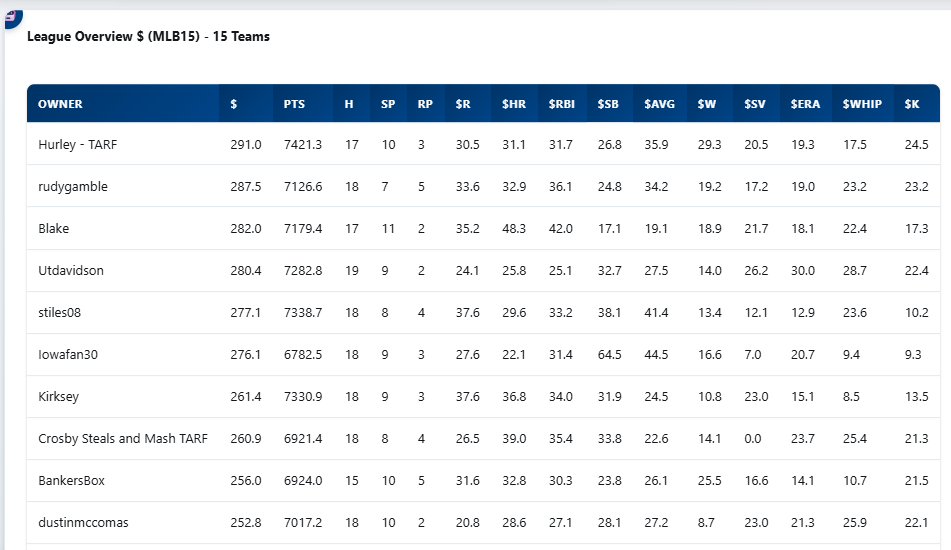
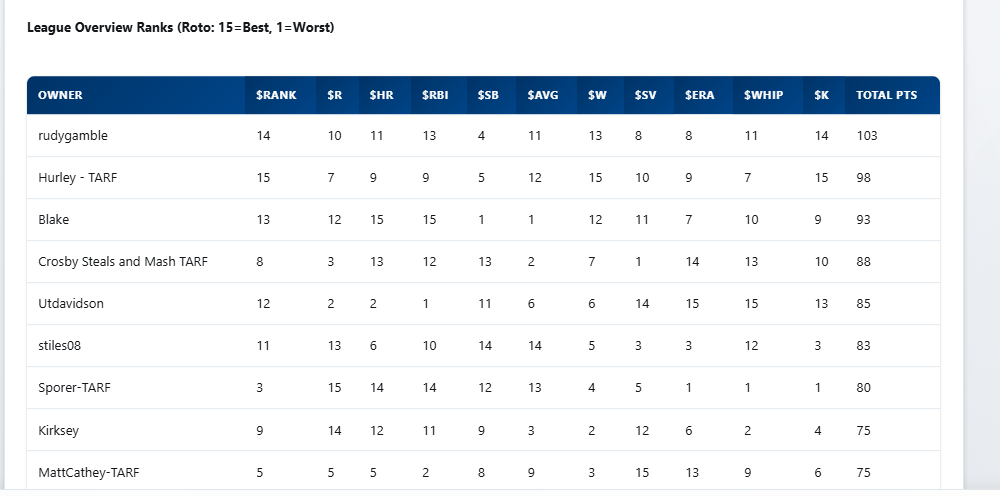
League Overview is a snapshot at how your team compares to your competitors for the rest of the season. If you are looking before the season starts, then it is merely evaluating the draft.
The League Overview totals each team’s category $ from the Razzball Rest of Season Player Rater across the various roto categories for all rostered players valued at $1+ for the league format. Any players valued below $1 are ignored as the assumption is that teams typically figure out ways to avoid below replacement value performers for the full season.
In the first table, leagues are sorted based on projected ROS $ and Points (see above for the points formula) for the $1+ players. In the second table, there is the projected standings using the category $.
Do not get hung up on the ROS standings order. The key value of this report is understanding your ROS strengths/weaknesses vis-a-vis your competitors. We focus so much on Season to Date standings. This is the other half of the puzzle.
What is Team Overview?
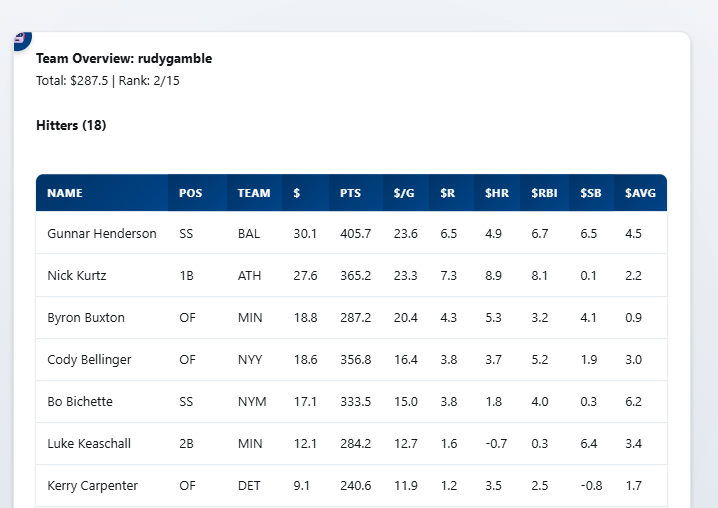
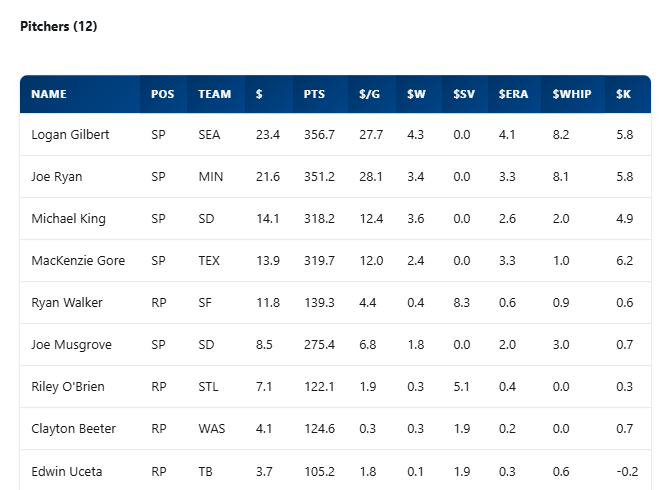
Team Overview shows the ROS value for every player on your roster. It will run on your team. If you want a different team’s overview, type “Team Overview” followed by their team name.
What are the Start/Sit reports?
There are three variations of the Start/Site report – Today, Tomorrow, and Weekly.
These show the Hittertron/Streamonator projections for all of your rostered players for the requested time period along with their projected $ and PTS.
Any players without projections for the Time Period are displayed under the “Active Hitters” and “Active Pitchers” tables under “Inactive Hitters” and “Inactive Pitchers”.
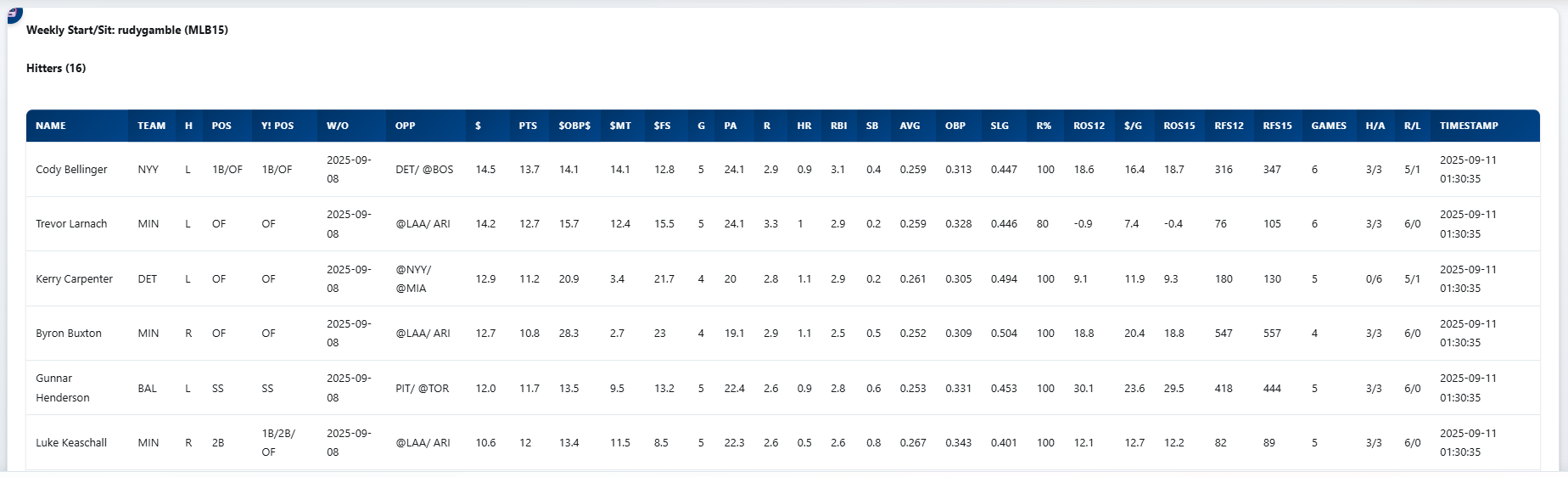
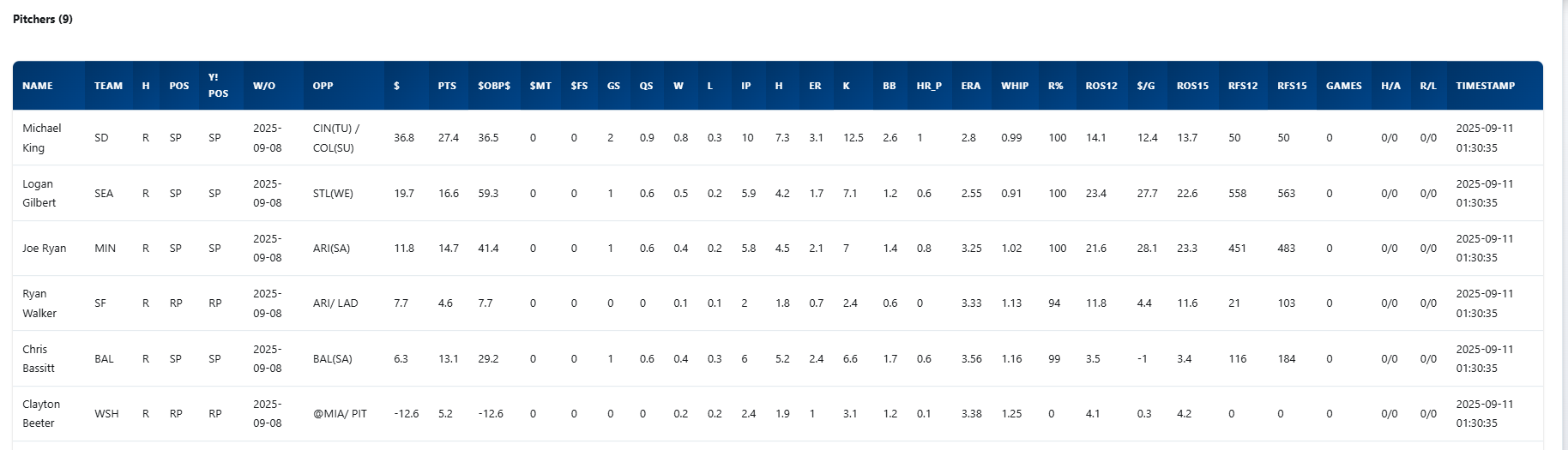
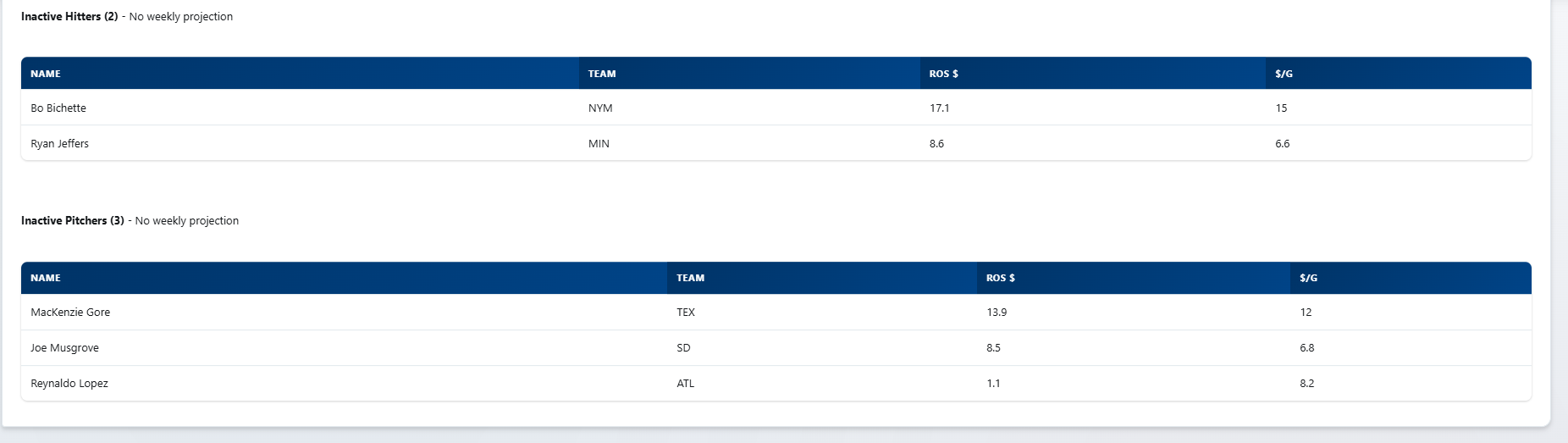
What are the Pickups reports?
Just like Start/Site, the three variations of this report are Today, Tomorrow, and Weekly.
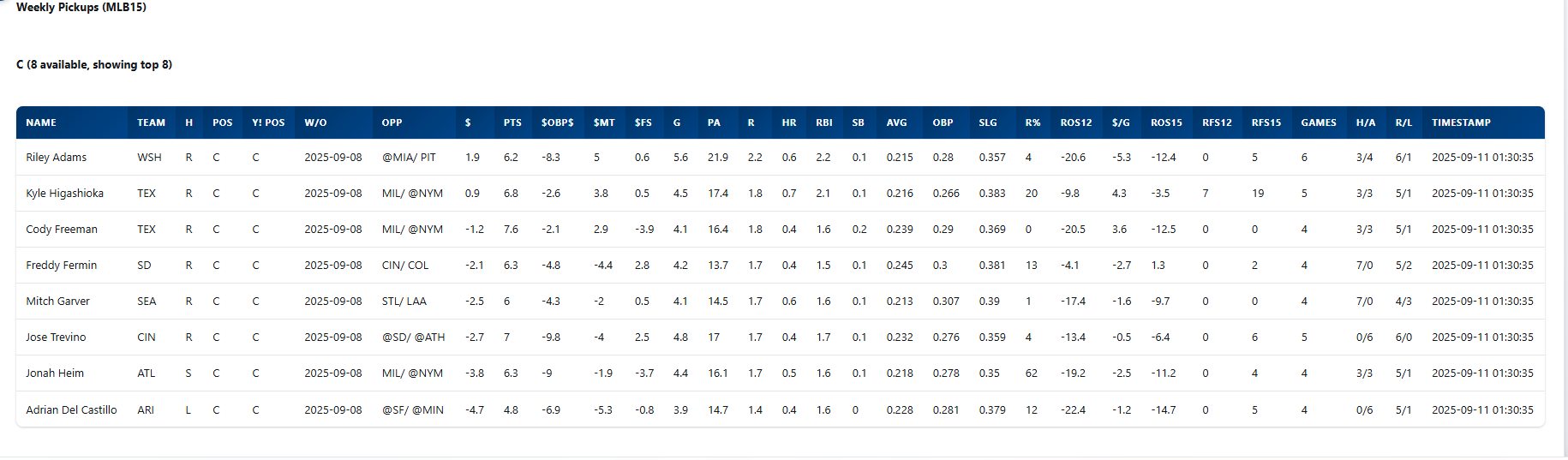
These reports provide the top available players available by position group (C, 1B/3B, 2B/SS, OF/DH, SP, and RP) ranked in descending order of their projected Hittertron/Streamonator values. Below are snippets showing the Catchers, 1B/3B, SP, and RP reports.
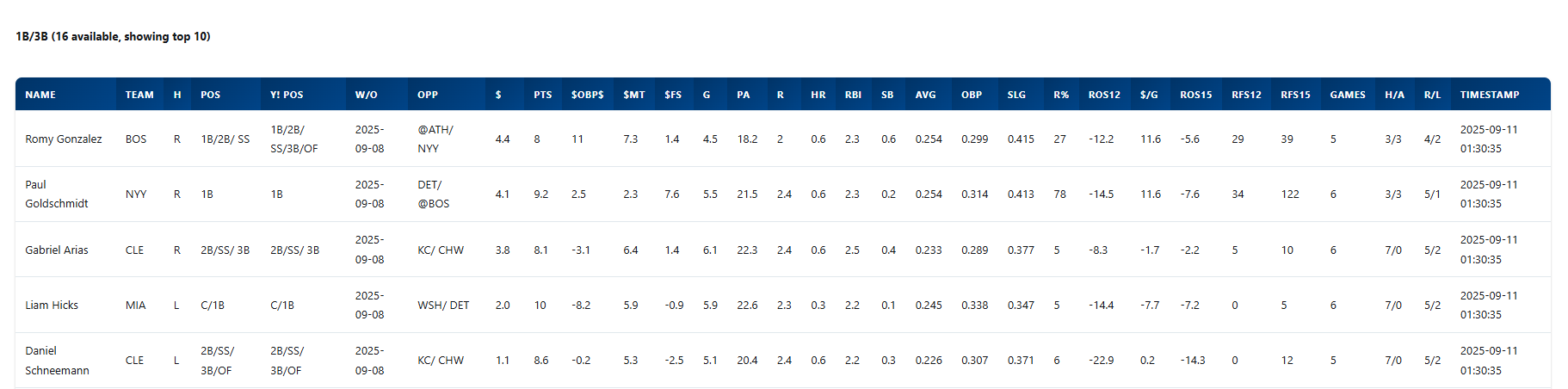
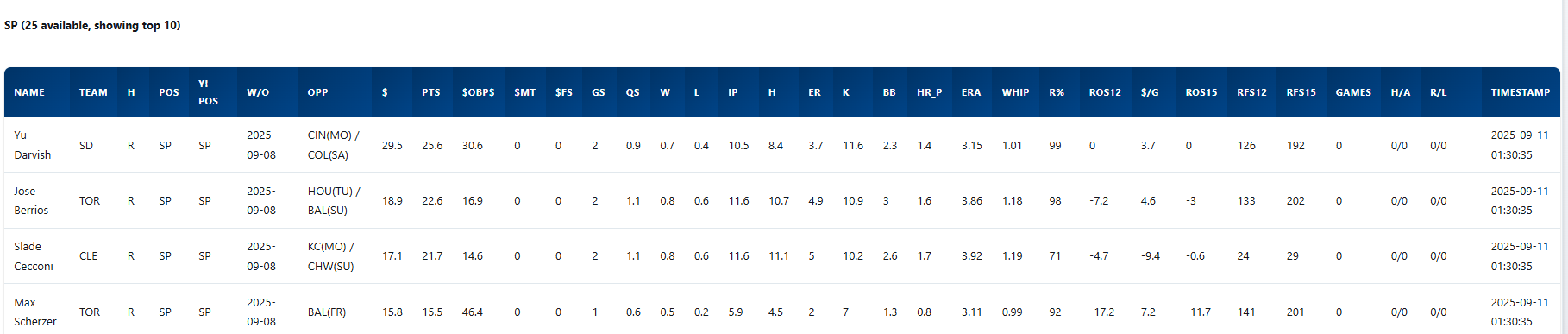
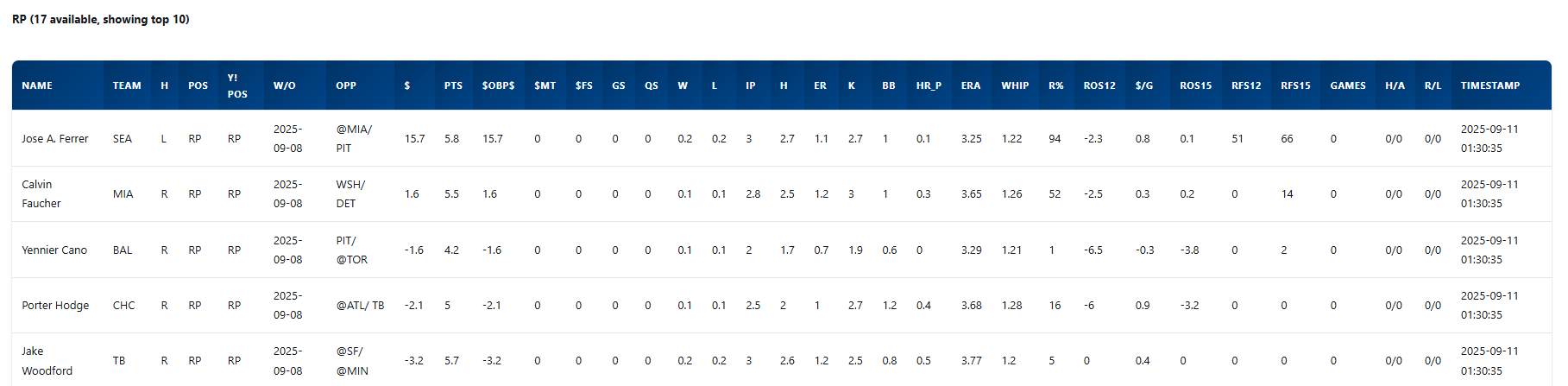 ‘
‘
What about Monday-Thursday and Friday-Sunday Start/Sit decisions?
The Monday-Thursday and Friday-Sunday values are in the Weekly Start/Sit and Pickups files.
We will be considering adding dedicated Monday-Thursday and Friday-Sunday Start/Site and Pickups report in the next release.
Querying ChatGPT Through Razzbot
We have hooked the Chatbot up to ChatGPT’s API to allow users to experiment with either ad hoc reporting or just asking impromptu questions. The biggest difference between just using ChatGPT directly is that Razzbot has direct access to the today/tomorrow/weekly/Rest of Season Razzball projections. In our limited testing, the results have been mixed. We see great promise in it and imagine it will only get better over time.
If you find something that works, let us know! Or keep it to yourself if you are stingy!
One note with ad hoc querying through ChatGPT. Each call to ChatGPT costs money. We are providing 100 free calls per month as part of the subscription. After that, you’ll need to get an API key through ChatGPT at https://platform.openai.com and can add that in the Settings.
Maintained by Rudy Gamble ([email protected])